> ## Documentation Index
> Fetch the complete documentation index at: https://docs.pavoai.com/llms.txt
> Use this file to discover all available pages before exploring further.
# Checkpoints & decisions
> How Agent Studio stays under your control: zero-trust checkpoints that surface for your judgment at every boundary that matters.
Agent Studio assumes nothing goes right on its own. A long, parallel program could quietly go wrong in a dozen places, so the work is built to **stop and ask** at every boundary that matters. Those stops are **decisions**, and they are how you stay in control of a program that mostly runs without you.
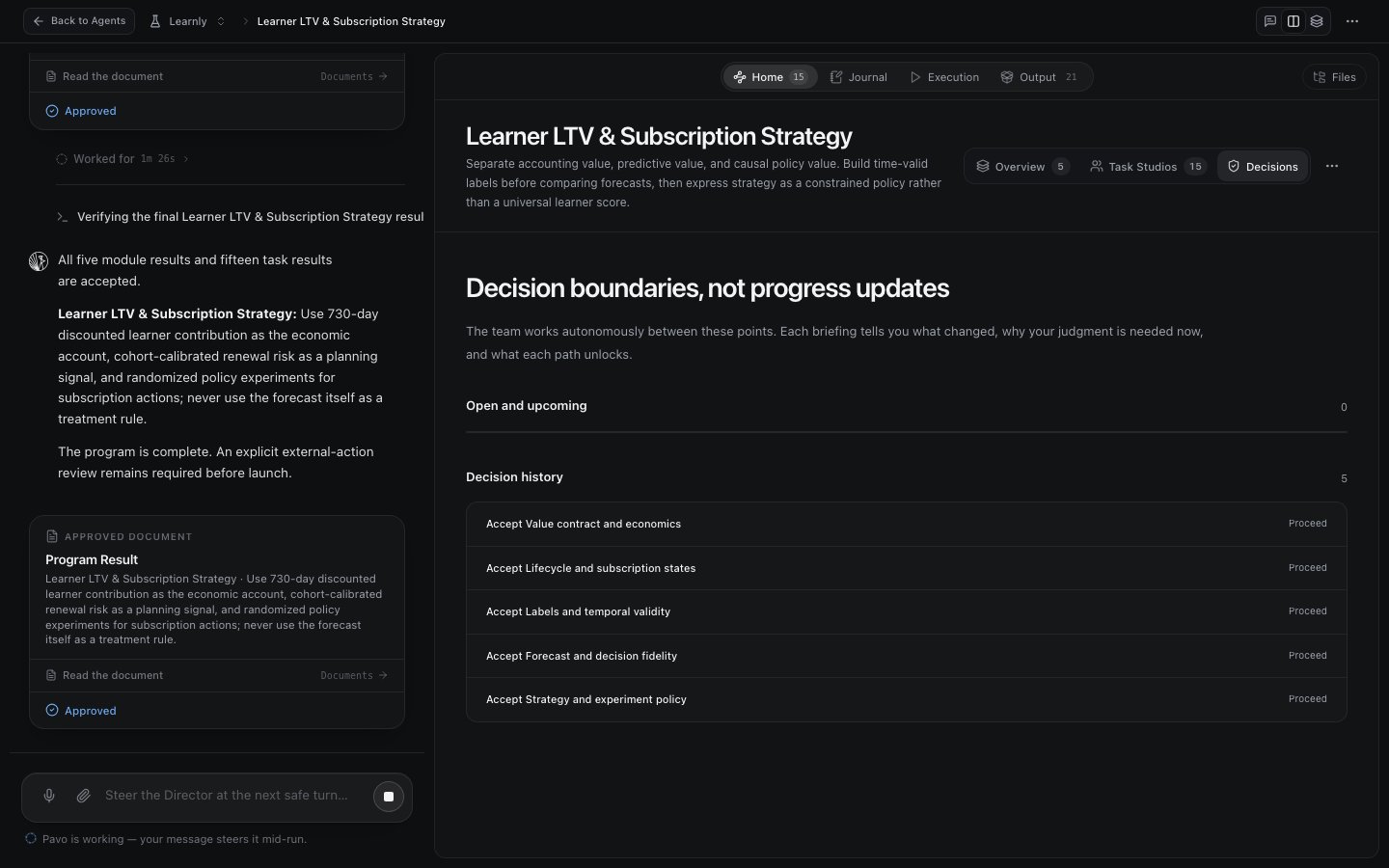
A decision is a **boundary, not a progress update.** Between decisions, the fleet works autonomously. At each decision, Pavo tells you what changed, why your judgment is needed now, and what each path unlocks, then waits.
 ## Where the work pauses
Every program's plan carries a checkpoint policy. By default, Pavo pauses:
* **After it frames the plan**: before any module runs.
* **Before expensive work**: before a day-scale job or a query across your full dataset.
* **When evidence changes direction**: a result that undercuts an assumption opens a checkpoint instead of quietly broadening the claim.
* **Before any external action**: nothing leaves the studio or touches production without your say-so.
On top of these, a decision can surface from *anywhere* in the fleet. In a program with dozens of agents, any one of them can raise a decision, and it bubbles up to you rather than being resolved silently.
The rule underneath all of this: **no silent escalation.** If an agent is missing the data it needs, or spots leakage, or finds the question has shifted, it stops and opens a decision: it does not paper over the gap with a broader guess. A checkpoint is the honest move.
## Decisions are yours to shape
The default checkpoints are a starting point. You tune them per program, and Pavo respects your choices for the whole run.
Decide where the fleet must stop. Want to review at the end of every module, or only at the risky ones? You choose the checkpoint boundaries.
Add your own habits as standing rules. For example: *before running a large query, run a cheap one on a small slice and let me sanity-check the result first.* Pavo will honor it throughout the program.
At each surfaced decision, accept a result and let the program proceed, redirect an agent, or add new work. Only after you act does the dependent work continue.
Encoding a habit once beats catching a mistake ten times. The "cheap query first" rule costs one sentence and saves every agent in the program from burning a full-dataset query on a bad join.
## Reading the decision log
The studio keeps every decision: the ones open and upcoming, and the full history of the ones you have made. Each accepted decision records what you approved and what it unlocked downstream, so the program's whole chain of judgment is auditable. When a result was accepted, you can see who accepted it and why the program was allowed to move on.
Working with a program this way feels less like launching a job and more like working with a teammate: it does the work, and it checks in at exactly the points where your judgment is worth more than its own.
## Next steps
What you're accepting when you accept a result.
Who raises the decisions, and who coordinates the fleet.
## Where the work pauses
Every program's plan carries a checkpoint policy. By default, Pavo pauses:
* **After it frames the plan**: before any module runs.
* **Before expensive work**: before a day-scale job or a query across your full dataset.
* **When evidence changes direction**: a result that undercuts an assumption opens a checkpoint instead of quietly broadening the claim.
* **Before any external action**: nothing leaves the studio or touches production without your say-so.
On top of these, a decision can surface from *anywhere* in the fleet. In a program with dozens of agents, any one of them can raise a decision, and it bubbles up to you rather than being resolved silently.
The rule underneath all of this: **no silent escalation.** If an agent is missing the data it needs, or spots leakage, or finds the question has shifted, it stops and opens a decision: it does not paper over the gap with a broader guess. A checkpoint is the honest move.
## Decisions are yours to shape
The default checkpoints are a starting point. You tune them per program, and Pavo respects your choices for the whole run.
Decide where the fleet must stop. Want to review at the end of every module, or only at the risky ones? You choose the checkpoint boundaries.
Add your own habits as standing rules. For example: *before running a large query, run a cheap one on a small slice and let me sanity-check the result first.* Pavo will honor it throughout the program.
At each surfaced decision, accept a result and let the program proceed, redirect an agent, or add new work. Only after you act does the dependent work continue.
Encoding a habit once beats catching a mistake ten times. The "cheap query first" rule costs one sentence and saves every agent in the program from burning a full-dataset query on a bad join.
## Reading the decision log
The studio keeps every decision: the ones open and upcoming, and the full history of the ones you have made. Each accepted decision records what you approved and what it unlocked downstream, so the program's whole chain of judgment is auditable. When a result was accepted, you can see who accepted it and why the program was allowed to move on.
Working with a program this way feels less like launching a job and more like working with a teammate: it does the work, and it checks in at exactly the points where your judgment is worth more than its own.
## Next steps
What you're accepting when you accept a result.
Who raises the decisions, and who coordinates the fleet.