> ## Documentation Index
> Fetch the complete documentation index at: https://docs.pavoai.com/llms.txt
> Use this file to discover all available pages before exploring further.
# Task Studios & the Director
> How a fleet of scoped agents does the work, each in its own studio, coordinated by a director that reconciles and self-corrects.
The plan says *what* to do. Task Studios and the Director are *how* it gets done: one scoped agent per piece of work, and one director above them that keeps the whole fleet coherent. This two-level shape is what lets a program run for hours without going off the rails.
## Every task has its own studio
*One durable owner, one scoped job.*
Each piece of a module runs in its own **Task Studio**, owned by a single agent for the life of the program. The LTV program ran fifteen, three per module, plus the Director's own. Because each studio owns one scoped job, its work is small enough to check: you can open it and see the objective, the code it wrote, the evidence it gathered, and the result it returned.
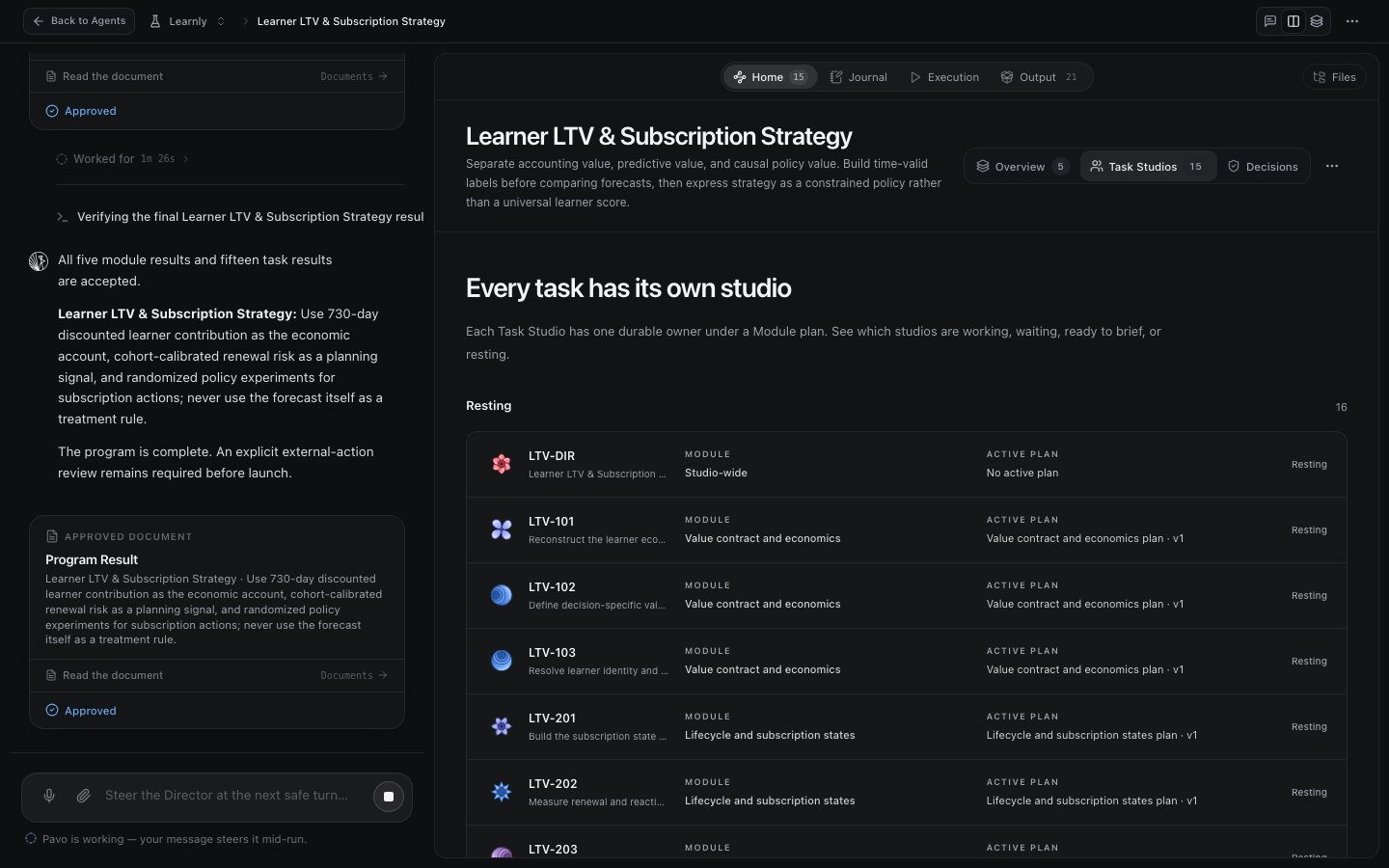 A Task Studio is always in one of a few states, so you can see the fleet at a glance:
| State | Meaning |
| ------------------ | ----------------------------------------------- |
| **Working** | The agent is actively doing its job. |
| **Waiting** | Blocked on an upstream result or a decision. |
| **Ready to brief** | Awaiting your instructions before it starts. |
| **Resting** | Done, result returned, available for follow-up. |
## The Director
*The agent above the agents.*
Above the Task Studios sits the **Director**: a single orchestrating agent (you'll see it narrate the program, and it appears as the *lead agent* in the studio journal). The Director is what makes the fleet more than a pile of parallel scripts. It:
* **Delegates** each module's work to Task Studios, in the order the plan requires.
* **Reconciles** across agents: when one agent produces a result another depends on, the Director tells the second to align its work to it.
* **Self-corrects**: it watches its agents' output and steps in on its own. In one LTV run it caught an audit bug in an agent's code and directed the fix, with no human in the loop.
* **Rebuilds the plan** when you add work mid-run, folding new modules or tasks into the existing flow.
This is the work a person normally has to hold in their head when running many threads at once: remembering that thread C now depends on what thread A just found. The Director carries that coordination so a long, parallel program stays coherent instead of contradicting itself.
## Working at the altitude you want
You are never forced to micromanage, and never locked out. Because you work *through* the Director, you choose how much control you take:
* **Steer the Director** for anything you trust it to handle. Drop a note at the bottom of the studio, *"add a learned-composite proxy at LTV-2474 and redo the downstream analysis"*, and it manages the change across every affected agent. Your message steers it at the next safe turn.
* **Dive into a Task Studio** when you want control. Open the agent working on, say, the selection gates, and give it specific instructions: *"I want more sensitivity: a high-revenue user must separate from a low-revenue one by at least this much. Add that as a qualifying criterion."* You can read its code and confirm it did what you asked.
Match your altitude to your trust and the stakes. A minor, reversible change? Steer the Director and move on. A load-bearing modeling choice? Drop into the studio and work with the agent directly. Different engineers land in different places, and that's the point.
## Zooming out
Because every agent, plot, and result lives in the one studio, a small instruction can trigger a lot of coordinated work. Add one new model and ask the Director to redo the analysis, and it already knows what the analyses were, what the findings were, and how the old models compared, so it returns a delta, not a from-scratch rerun. That compounding is covered in [Evidence, results & outputs](/agent-studio/evidence-results).
## Next steps
How the fleet pauses for your judgment.
What the agents hand back, and why you can trust it.
A Task Studio is always in one of a few states, so you can see the fleet at a glance:
| State | Meaning |
| ------------------ | ----------------------------------------------- |
| **Working** | The agent is actively doing its job. |
| **Waiting** | Blocked on an upstream result or a decision. |
| **Ready to brief** | Awaiting your instructions before it starts. |
| **Resting** | Done, result returned, available for follow-up. |
## The Director
*The agent above the agents.*
Above the Task Studios sits the **Director**: a single orchestrating agent (you'll see it narrate the program, and it appears as the *lead agent* in the studio journal). The Director is what makes the fleet more than a pile of parallel scripts. It:
* **Delegates** each module's work to Task Studios, in the order the plan requires.
* **Reconciles** across agents: when one agent produces a result another depends on, the Director tells the second to align its work to it.
* **Self-corrects**: it watches its agents' output and steps in on its own. In one LTV run it caught an audit bug in an agent's code and directed the fix, with no human in the loop.
* **Rebuilds the plan** when you add work mid-run, folding new modules or tasks into the existing flow.
This is the work a person normally has to hold in their head when running many threads at once: remembering that thread C now depends on what thread A just found. The Director carries that coordination so a long, parallel program stays coherent instead of contradicting itself.
## Working at the altitude you want
You are never forced to micromanage, and never locked out. Because you work *through* the Director, you choose how much control you take:
* **Steer the Director** for anything you trust it to handle. Drop a note at the bottom of the studio, *"add a learned-composite proxy at LTV-2474 and redo the downstream analysis"*, and it manages the change across every affected agent. Your message steers it at the next safe turn.
* **Dive into a Task Studio** when you want control. Open the agent working on, say, the selection gates, and give it specific instructions: *"I want more sensitivity: a high-revenue user must separate from a low-revenue one by at least this much. Add that as a qualifying criterion."* You can read its code and confirm it did what you asked.
Match your altitude to your trust and the stakes. A minor, reversible change? Steer the Director and move on. A load-bearing modeling choice? Drop into the studio and work with the agent directly. Different engineers land in different places, and that's the point.
## Zooming out
Because every agent, plot, and result lives in the one studio, a small instruction can trigger a lot of coordinated work. Add one new model and ask the Director to redo the analysis, and it already knows what the analyses were, what the findings were, and how the old models compared, so it returns a delta, not a from-scratch rerun. That compounding is covered in [Evidence, results & outputs](/agent-studio/evidence-results).
## Next steps
How the fleet pauses for your judgment.
What the agents hand back, and why you can trust it.